
AI receptionist for small businesses

Your calls, answered. Every action logged.

Sí Call picks up when you can’t. It answers from the business details you give it, takes messages, and writes each call up with a transcript and a summary.

Pre-launchPlans open at launch, and nothing can be bought yet. A Founding 50 pledge is free, with no card.

What Sí Call does

  • Answers when you can’t

    It picks up while you’re on a job, with a customer or closed for the night, up to your plan’s number of calls at once.

  • Works from your business info

    Add your hours, services, prices and policies, plus answers to the questions callers ask most. It answers from what you add.

  • Writes each call up

    When the call ends, you get the transcript, a short summary and the outcome, time-stamped and waiting in your dashboard.

  • Takes a message when it can’t help

    When a question goes beyond what you’ve added, it’s built to take a message: who called, their number and what they need.

The research

Calls arrive while you’re on the job. That’s when many go unanswered.

Taps on a Google listing’s Call button cluster in working hours: about 19 in 20 come Monday to Friday, peaking between 10 a.m. and noon.1 Those are the hours you’re under a sink, in court or with a client.

Calls placed from a Google listing, by hour of the day

Typical listing · Sep 2017 to Dec 2018

Busiest: 10 AM and 11 AM, 12% each. Point at the chart or use the arrow keys to read any hour.

Median share of a listing’s calls in each hour, from BrightLocal’s study of about 45,000 Google listings in the US, Canada, UK and Australia. Only taps on the listing’s Call button count, so quiet hours are understated.1
Show the data as a table
Median share of calls placed from Google listings, by hour of day
HourShare of calls
12 AM0%
1 AM0%
2 AM0%
3 AM0%
4 AM0%
5 AM0%
6 AM0%
7 AM1%
8 AM4%
9 AM10%
10 AM12%
11 AM12%
12 PM11%
1 PM11%
2 PM11%
3 PM11%
4 PM9%
5 PM4%
6 PM2%
7 PM1%
8 PM1%
9 PM1%
10 PM0%
11 PM0%

When nobody picks up

The studies below measure different things, and each has limits, which we list in the sources. They still point the same way: many calls go unanswered, few are returned quickly, and callers say they move on.

  • 4 in 10

    first calls to law firms and home-service companies went unanswered in business hours.2Mystery shopping · calls placed 2020–21

  • 52%

    of calls to home-service businesses reached a person.3One call-tracking vendor’s benchmark · 2026

  • 69%

    of missed calls got no callback within 48 hours.4One phone vendor’s customer data · 2026

  • 78%

    of consumers surveyed said they had abandoned a business after an unanswered call.5One vendor’s survey, self-reported · 2025

Where calls come from

Wherever someone finds your number, Sí Call is the one who picks up.

People call whichever number is in front of them: a search result at 9 p.m., the side of your van at a red light, the sign over your door. However they found you, the call reaches the same place, and Sí Call answers with your business name and the details you’ve given it.

  • Search results and your Google listing.

    In a Google-commissioned Ipsos survey from 2019, 60% of US smartphone users said they had contacted a business directly from search results, for example by tapping to call.6

  • Vans, job-site signs and the sign over your door.

    Someone sees your work down the street and dials the number on the van. Those calls ring the same line as the rest.

  • Your website’s contact page.

    Asked how they’d prefer to contact a local business they found online, 60% of US consumers in a 2019 BrightLocal survey chose a phone call, and 4% a contact form.7

Illustrative · Fictional business
Search: plumber near me
  1. Cedar & Main Plumbing

    Plumber · Mission St

    Open · Closes 6 PM

    (415) 555-0142

    Sí Call answered

  2. Harbor Drain & Rooter

    Plumber · Valencia St

    Closes 5 PM

  3. Bayline Pipe Co.

    Plumbing service · 24th St

    Closes 7 PM

A local search on a phone. The caller taps Call on the first listing. Illustration of a phone showing local results for “plumber near me”. The first result is Cedar & Main Plumbing, a fictional business, with Call, Directions and Website buttons. The caller taps Call, and a chip reads “Sí Call answered”.

Your number, out in the world

Two renders of places people meet your number. They picture the idea; neither is a campaign or a customer.

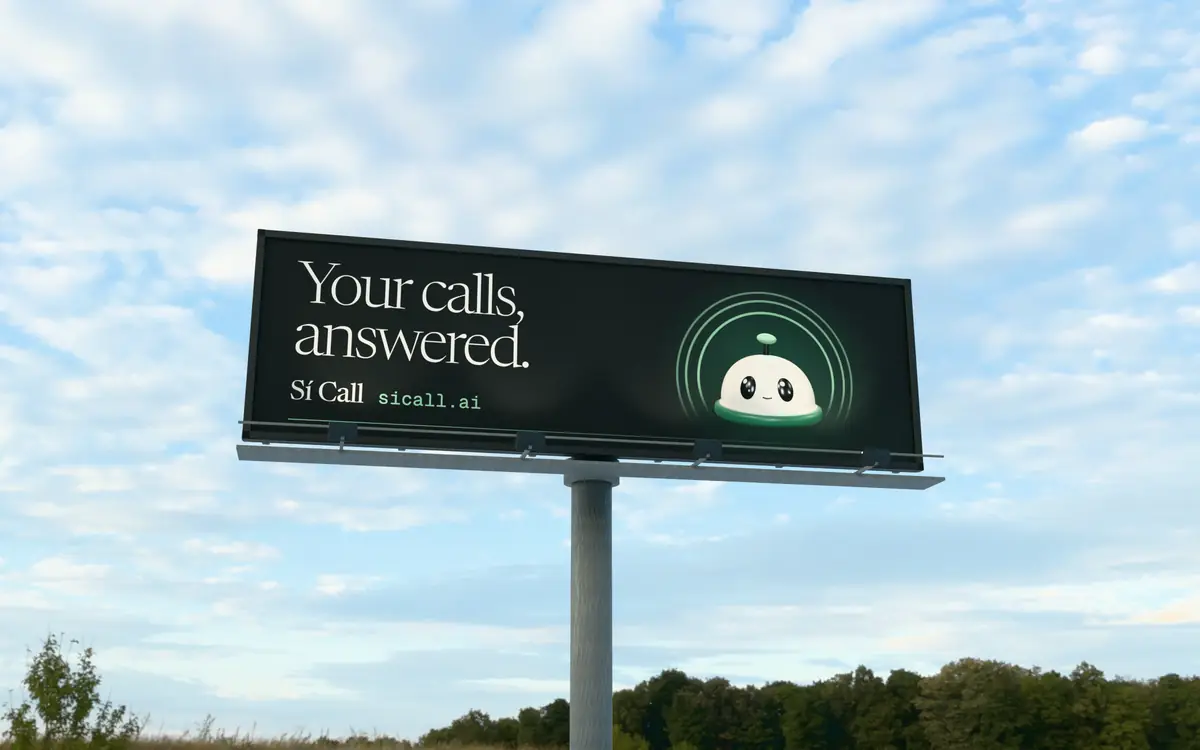
A roadside billboard against a pale evening sky. It reads: Your calls, answered. Sí Call, sicall.ai, beside Ding, a smiling front-desk bell.
IllustrativeOur own ad, rendered on a roadside billboard.
A phone lying on a wooden counter. Its screen shows a search for a plumber near me, with a fictional business, Cedar & Main Plumbing, at the top.
Illustrative · Fictional businessA search at 9 p.m.

Keep your number

At launch, you forward the business number you already have to Sí Call. The number on your van, your sign and your Google listing stays the same, and callers dial it exactly as before.

  • Forward the number you haveAt launchYour carrier and your number stay the same. Nothing is ported.
  • Guided forwarding setupComing soonStep-by-step instructions for your carrier, and a check that forwarding works.
  • A phone number from Sí CallComing soonFor a business that would rather start with a new number.
A conversation

It asks what a good front desk would ask. Then it writes the call up.

By default, callers first hear a short notice that they’re speaking with an AI, then your greeting. Choose an example call below to see what the caller hears beside what gets saved.

Example · Fictional business

The call, as a transcript

Marcus Webb(415) 555-0163

Call44 s

  1. Sí Call0:00

    AI notice, before the greetingYou're speaking with an AI assistant, and this call is recorded and transcribed.

    Thanks for calling Cedar & Main Plumbing. How can I help?

  2. Marcus0:07

    Hi, my kitchen sink won’t drain. Can someone come out this week?

  3. Sí Call0:12

    I can book a visit for that. Can I get your name?

  4. Marcus0:16

    Marcus Webb.

  5. Sí Call0:19

    Thanks, Marcus. I have Tuesday at 9 AM or Wednesday at 1 PM. Which works better?

  6. Marcus0:27

    Tuesday at 9.

  7. Sí Call0:30

    I have you down for Tuesday at 9. Is that right?

  8. Marcus0:34

    Yes, that’s right.

  9. Sí Call0:36

    You’re booked for Tuesday at 9. Thanks for calling, Marcus.

What gets saved

Saved 2:31 PM

Caller
Marcus Webb(415) 555-0163
Reason
Kitchen sink won’t drain
Summary
Booked a visit for a slow kitchen drain on Tuesday at 9 AM. Read back and confirmed.
Outcome
Booked
Booking
Tue 15, 9:00–10:00 AM, on your calendar

Transcript and summary filed with the call, time-stamped.

When a call qualifies, a separate lead is filed in Leads with a score from 0 to 100.

It asks for a name, offers your open times, books the slot the caller picks, and reads it back before the call ends. At launch

Example: a homeowner with a slow kitchen drain books Tuesday at 9 and hears the booking read back.

The call, as a transcript

Tom Alvarez(415) 555-0114

Call38 s

  1. Sí Call0:00

    AI notice, before the greetingYou're speaking with an AI assistant, and this call is recorded and transcribed.

    Thanks for calling Cedar & Main Plumbing. How can I help?

  2. Tom0:07

    Do you work on tankless water heaters?

  3. Sí Call0:10

    Yes. We install and repair tankless water heaters.

  4. Tom0:14

    Are you open on Saturdays?

  5. Sí Call0:16

    Yes, Saturdays from 8 AM to 2 PM.

  6. Tom0:20

    Is there a charge to come out?

  7. Sí Call0:23

    There’s an $89 service call fee, and it goes toward the repair if you go ahead.

  8. Tom0:30

    Great, that’s all I needed.

  9. Sí Call0:32

    Glad to help. Thanks for calling Cedar & Main Plumbing.

What gets saved

Saved 11:08 AM

Caller
Tom Alvarez(415) 555-0114
Reason
Questions about tankless water heaters
Summary
Asked questions about tankless water heater repair, Saturday hours and the service call fee. Answered from the business info.
Outcome
Resolved

Transcript and summary filed with the call, time-stamped.

When a call qualifies, a separate lead is filed in Leads with a score from 0 to 100.

It answers from what you’ve added: your hours, services, prices and common questions. When a question goes beyond that, it’s built to take a message instead of improvising.

Example: a caller asks about tankless heaters, Saturday hours and the service call fee, and hears the answers you wrote.

The call, as a transcript

Dana Reyes(415) 555-0188

Call52 s

  1. Sí Call0:00

    AI notice, before the greetingYou're speaking with an AI assistant, and this call is recorded and transcribed.

    Thanks for calling Cedar & Main Plumbing. How can I help?

  2. Dana0:07

    My water heater is leaking all over the garage floor. Can someone come today?

  3. Sí Call0:13

    I’m sorry to hear that. I can’t confirm a same-day visit, but I can take a message so the team can call you back. What’s your name?

  4. Dana0:22

    Dana Reyes.

  5. Sí Call0:25

    Thanks, Dana. Is (415) 555-0188 the right number for a callback?

  6. Dana0:30

    Yes, that’s my cell.

  7. Sí Call0:32

    What should I tell the team?

  8. Dana0:35

    It’s leaking at the base. I’m home weekday mornings.

  9. Sí Call0:41

    Got it. I’ve taken your message, and the team will call you back.

What gets saved

Saved 2:15 PM

Caller
Dana Reyes(415) 555-0188
Reason
Water heater leaking
Summary
The water heater in Dana’s garage is leaking at the base. Wants a service visit soon; home weekday mornings.
Outcome
Follow-up needed
Next step
Follow up within 24–48 hours

Transcript and summary filed with the call, time-stamped.

When a call qualifies, a separate lead is filed in Leads with a score from 0 to 100.

When the caller needs something only your team can decide, it takes a message: who called, their number and what they need, filed with the call.

Example: a leaking water heater. It doesn’t promise a same-day visit; it takes the details for your callback.

Three example calls to Cedar & Main Plumbing, a fictional business. Each tab shows the call as a transcript, which opens with the AI notice the caller hears, and beside it what gets saved to the call record. A note under the record says that when a call qualifies, a separate lead is filed in Leads with a score from 0 to 100.

See how a call becomes a record

The call record

Each call, written up.

When a call ends, Sí Call files it with a transcript, a short summary and the outcome, time-stamped. You can see who called, what they needed and what to do next without ringing them back to ask.

What each record holds

Transcript
The whole conversation, turn by turn, so you can check what was asked and how it was answered.
Summary
A few lines on who called and what they needed, written when the call ends.
Outcome and time stamp
When the call came in, how long it lasted, how it ended (booked, or needs a call back) and a suggested next step.

A call that qualifies also files a separate lead in your leads list, with what the caller wanted, a score from 0 to 100 and a stage. The call record doesn’t show or link to it.

How the AI notice and recording work
Example · Fictional business

CallsToday

Saved 2:15 PM

Dana Reyes

(415) 555-0188Today, 2:14 PM · 52 s

Follow-up needed
Reason

Water heater leaking

Summary

The water heater in Dana’s garage is leaking at the base. Wants a service visit soon; home weekday mornings.

Suggested next stepFollow up within 24–48 hours

Transcript excerpt

  1. Sí Call0:00

    AI notice You're speaking with an AI assistant, and this call is recorded and transcribed. Thanks for calling Cedar & Main Plumbing. How can I help?

  2. Dana0:07

    My water heater is leaking all over the garage floor. Can someone come today?

  3. Sí Call0:13

    I’m sorry to hear that. I can’t confirm a same-day visit, but I can take a message so the team can call you back. What’s your name?

Card numbers and Social Security numbers are removed from the stored transcript and summary.

When a call qualifies, a separate lead is filed in Leads with a score from 0 to 100.

Example call record for Cedar & Main Plumbing, a fictional business. Caller Dana Reyes, (415) 555-0188, called today at 2:14 PM for 52 seconds about a leaking water heater. The record shows the reason, a two-line summary, the outcome (follow-up needed), the suggested next step (follow up within 24 to 48 hours) and the first lines of the transcript, which open with the AI notice. A note under the record says that when a call qualifies, a separate lead is filed in Leads with a score from 0 to 100.

Card numbers and SSNs are removed.

Card numbers and Social Security numbers are stripped from the transcript and the summary before either one is stored.

A message when it can’t help.

If a caller needs something it can’t answer, it takes a message: who called, their number and what they need, filed with the call.

History you can filter and export.

Filter past calls by status, outcome or date, and export the list to CSV for your records or a spreadsheet.

Booking

It offers your open times and reads the booking back.

When a caller wants an appointment, Sí Call asks for their name, offers the times you have open and books the one they pick. Before they hang up, it reads the booking back: the day, the time and who to expect.

At launch

Where the booking goes

It checks your open times and books the slot the caller picks, on a connected Google Calendar or Sí Call’s built-in calendar. If the time they ask for is taken, it offers a few others.

  • Google Calendar or the built-in calendarYou choose one when you set up.At launch
  • Changes and cancellations by phoneUntil then, it takes a message so your team can call back.Coming soon
  • Text confirmations and remindersSent only to callers who agree to them.Coming soon
Try a sample booking in your browser
Example · Fictional business

This week

Cedar & Main Plumbing · Built-in calendar

Sí Call, reading it back

“I have you down for Tuesday at 9. Is that right?”

Example week calendar for Cedar & Main Plumbing, a fictional business, Monday 14 to Friday 18, 8 AM to noon, with eight existing jobs. A new booking drops into Tuesday at 9:00: Marcus Webb, kitchen drain. Sí Call then reads it back to the caller.
Leads

Callers become leads, scored by rules you can read.

When a call qualifies, the caller goes into your leads list with their name and number, what they asked for and a score from 0 to 100. The rules behind that score are written out below.

When a call becomes a lead

A completed call becomes a lead when it lasts 30 seconds or more, or when it includes a booking, a quote request, an urgent request or a qualified caller. Calls under 15 seconds don’t become leads.

Your newest leads open first, each with its score. Filter them by status, and mark each one contacted, qualified, won or lost as you work through them.

Where your leads can go

  • Export to CSVYour leads or your call list, whenever you like.At launch
  • HubSpot and SalesforcePlanned
  • Webhooks to your other toolsComing soon
See what each plan includes
Example · Fictional business
Leads · Cedar & Main Plumbing

Leads 6

A completed call becomes a lead when it lasts 30 seconds or more, or includes a quote request, an urgent request or a qualified caller.

Lead

Priya Nair

(415) 555-0127Quote/pricing inquiry

95Hot

Cold under 50Warm 50+Hot 80+

How this score was built

  1. Starts at50
  2. Booked an appointment (+30)not applied
  3. Call ended as a qualified lead (+25)not applied
  4. Asked for a quote or estimate (+20)+20
  5. Said it was urgent (+15)+15
  6. Call over 1, 2 or 5 min (+5, +10, +15)2 min 20 s+10
  7. Transcript wording, keyword check (+10 or −15)not applied
  8. Score, kept between 0 and 10095

Also added when they apply: an email on file +10, a repeat caller +10.

From the call summary

Needs an estimate to replace a corroded main shut-off valve, ASAP.

StageQualified

  • Mark contacted
  • Qualify (the current stage, so it is disabled)
  • Mark won
  • Mark lost
Example leads list for Cedar & Main Plumbing, a fictional business: six callers with their number, intent, a score from 0 to 100 marked hot, warm or cold, a stage (contacted, qualified, won or lost; a new lead shows its priority there instead) and when they were last contacted. A side panel shows how the selected lead's score was built from the scoring rules, the summary of the call it came from, and the buttons that move a lead to another stage. Choose a lead to see its score.

The scoring rules, in full

Each lead starts at 50 points and is kept between 0 and 100. 80 and up is hot; 50 and up is warm.

See every scoring ruleHide the scoring rules

What happened on the call adds points or takes them away.

  • 80 and up is hot. A booking on its own gets a lead here.
  • 50 to 79 is warm. The starting score sits here.
  • Under 50 is cold. Only the negative word check pulls a lead this low.
What happenedPoints
Starting score50
A booking was made+30
The caller was marked qualified+25
They asked for a quote, an estimate or a price+20
They said it was urgent+15
The call ran over 1, 2 or 5 minutes+5 / +10 / +15
Also counted
They have called you before+10
You have an email address for them+10
The transcript’s wording reads positiveA simple keyword check+10
The transcript’s wording reads negativeThe same keyword check−15
The total is kept between0 and 100
Your business info

Teach it your business.

Callers ask when you’re open, what you charge and whether you do the job they need. Add those details once, in your own words, and Sí Call answers from them.

  1. Add your hours and services

    Put in your opening hours, your address, the services you offer and what they cost.

  2. Add your policies and answers

    Write down your policies and the answers to questions callers ask most, like parking, deposits or how soon you can come out.

  3. It answers from what you added

    On a call, Sí Call answers from those entries. When a question goes beyond them, it’s built to take a message instead of improvising.

  4. Keep it current

    Edit an entry when something changes, or switch it off for a while without deleting it.

Coming soon

Import from your Google Business Profile or website. Sí Call will draft your entries for you to check. Until then, you add them yourself, as in the steps above.

Compare setup help on each plan
Coming soon · Illustrative

Step 1 of 3

Teach Sí Call your business

Find your business listing. Sí Call drafts your hours, services and common answers for you to check.

Google Business Profile

Cedar & Main Plumbing

Draft from your listing

Ready to review

Cedar & Main Plumbing

Plumber · Mission District, San Francisco

Hours
Mon–Fri7 AM – 6 PMSat8 AM – 2 PMSunClosed
Services
  • Leak repair
  • Water heaters
  • Drain cleaning
  • Repiping
  • Fixture installs
Answers

Do you give estimates?Yes, free estimates on installs and replacements.

Which areas do you cover?San Francisco and Daly City.

Read-only: importing doesn’t change your listing.

What happens next?

You check each answer, fix anything that’s off, and switch entries on or off. Sí Call answers callers from what you keep.

A planned setup step: pick your listing, then check the draft it fills in. Not built yet. Illustration of a planned onboarding step called “Teach Sí Call your business”. The owner types Cedar & Main into a business listing search, picks Cedar & Main Plumbing, a fictional business, from the suggestions, and a draft fills in: opening hours, five services and two common answers, ready for the owner to review before continuing.
After the call

Stay in the loop.

Your dashboard shows each call once it’s filed: who called, what they needed and who became a lead. At launch, an email after each call tells you it’s there. Alerts by text or phone notification, and a mobile app, are coming soon.

What’s ready at launch, and what’s next

  • Calls, summaries and leads in your dashboardSign in to catch up between jobs.At launch
  • An email to you after each callWith a link to the call in your dashboard.At launch
  • An alert by text or phone notificationComing soon
  • A mobile appComing soon
Read the FAQ on alerts and texting
Example · Coming soon
Sí Callnow

New call · Cedar & Main Plumbing

Dana Reyes · (415) 555-0188 · 52 s

Reason

Water heater leaking

Summary

The water heater in the garage is leaking at the base. Dana is home weekday mornings.

Next stepFollow up within 24–48 hours
A call alert, opened on a lock screen. Phone alerts like this are coming soon; at launch, an email after each call links to the call in your dashboard. Example of a phone lock screen showing a “New call” alert from Sí Call for Cedar & Main Plumbing, a fictional business. The alert opens into the call summary: the caller, the reason (water heater leaking), a two-sentence summary, and the suggested next step, follow up within 24 to 48 hours.
Trust

Honest by design.

Callers are told they’re talking to an AI in the opening words of each call. Here’s what we store, what we strip out, and what we don’t have yet.

The first words on each call

With the default settings, each call opens with the sentence shown here, before your greeting. If your greeting already says it’s an AI, only the recording notice is added. Telling callers they’re talking to an AI can’t be switched off, and if someone asks mid-call, it’s instructed to say plainly that it’s an AI.

Calls are recorded by default (“Record calls”), and the default notice says so. Choose “Don’t record calls” and no audio is recorded, and no transcript is saved to your call history. The call is still transcribed as it happens so Sí Call can answer, and by default the notice says “This call is transcribed in real time.” instead. The notice plays in both settings, whatever state you or your caller are in.

Example · Fictional business
Call opening
  1. Notice

    “You’re speaking with an AI assistant, and this call is recorded and transcribed.”

  2. Your greeting

    “Cedar & Main Plumbing, how can we help today?”

AI noticeAlways onCan’t be switched off.
Recording notice
  • Record callsDefaultThe call is recorded and transcribed, and the default notice says so.
  • Don’t record callsNo audio is recorded, and no transcript is saved to your call history. By default the notice says “This call is transcribed in real time.”
The default notice, word for word, before a fictional business’s greeting.

Card and Social Security numbers, removed.

They’re stripped from each transcript and summary before it’s stored. The audio recording isn’t redacted, so it still holds what was said.

HTTPS, enforced. Encrypted at rest.

Stored data is encrypted at rest by default. For this site and your dashboard:

HTTPS enforced by HSTS (max-age 1 year, includeSubDomains, preload)

Your records, yours to export.

Download your call list and your leads as CSV files from the dashboard. They open in any spreadsheet.

Secrets kept out of logs.

Our logger masks API keys, tokens, passwords and other credentials it recognizes before a line is written.

What we don’t have, said plainly.

We hold no SOC 2 report and no FedRAMP authorization. We don’t publish an uptime figure, because we don’t monitor uptime yet.

English today. Spanish soon.

Sí Call answers in English today. Spanish is coming soon, and until it’s ready we won’t present it as working.

Coming soon
Try it now

Talk to it in your browser.

Talk with Sí Call for up to a minute, right on this page. Ask how it works, or play a customer calling a business. You’ll need a microphone. Sample bookings are examples only: the demo makes up prices and open times as it goes.

  1. Press Start session.Your browser asks for the microphone. It stays closed until you press Start.
  2. Ask, or try a sample call.Ask what Sí Call does, or try a sample call: you play a customer, and it answers as the receptionist.
  3. Read it back.Open the transcript as you talk. In a sample call it makes up times and prices and confirms the booking out loud; nothing goes on a real calendar.

Try Sí Call

Ready when you are

Start the session, then talk naturally with Sí Call.

What can I ask?
  • “How would you answer calls for my business?”
  • “Can we try a customer calling to book an appointment?”
  • “What happens when a caller needs a person?”

Ask a question or try a sample call. Sample bookings are examples only.

Audio settings
Pricing

Plans by the minute, from $75 a month.

Every plan runs the same AI receptionist. Plans differ by minutes, calls at once, and how much hands-on help you get.

At launchPlans, prices and limits below are the launch terms. Nothing can be bought yet, and features marked “Coming soon” aren't built yet.

EnterpriseCustom

For 10,000+ minutes a month, or 10+ locations. A custom contract with a 12-month term.

Talk to us about Enterprise
  • No setup fee.
  • Each call is rounded up to the whole minute.
  • Self-serve plans are billed monthly. Cancel any time.
Founding 50

Pledge a spot to hold 20% off Starter, Growth or Pro for 12 consecutive months from your first paid invoice. It’s free, needs no card, and you can withdraw any time.

See full pricing
Questions

Your questions, answered.

Straight answers about launch, callers, booking and billing. Ask us anything else and a person will reply.

Can I buy Sí Call today?

Not yet. Plans open at launch, and nothing can be bought before then. In the meantime, you can talk to it in your browser on this page, and pledge a Founding 50 spot to hold 20% off Starter, Growth or Pro for 12 consecutive months from your first paid invoice. Pledging is free, needs no card, and you can withdraw any time.

Will callers know it’s an AI, and that they’re being recorded?

By default, yes. Before your greeting, callers hear: “You’re speaking with an AI assistant, and this call is recorded and transcribed.” The AI part can’t be switched off. Choose “Don’t record calls” and no audio is recorded, and no transcript is saved to your call history. The call is still transcribed live so Sí Call can answer, and by default the notice says “This call is transcribed in real time.”

Does it speak Spanish?

Not yet in a way we can promise. English is the language we support today, and Spanish is coming soon. We’d rather say so plainly than have a caller find out halfway through a conversation. When Spanish is ready, this answer and the labels on this page will change.

Can I keep my business number?

Yes. At launch you’ll forward your existing number to Sí Call, so you keep your number and your carrier, with no porting. A guided forwarding setup, with a check that forwarding works, is coming soon, and so are Sí Call phone numbers for businesses that want a new line.

Can it book appointments?

At launch, yes. It checks your open times and books the slot the caller picks, on a connected Google Calendar or Sí Call’s built-in calendar, then reads the booking back before the caller hangs up. Changing or cancelling an appointment by phone isn’t supported yet; it takes a message so your team can call back. Text confirmations are coming soon.

Will it text my callers, or alert me after a call?

It won’t text your callers yet. Texting is built but not switched on, because each business first needs its own registered texting number. At launch it emails you after each call, with a link to the call in your dashboard. Alerts by text or phone notification are coming soon. Calls and leads show up in your dashboard, and by default each call’s summary and transcript are there too.

What happens when two people call at once?

At launch, each plan answers a set number of calls at the same time: from 1 on Starter to 6 on Scale. If more people call than your plan covers, the extra caller hears “All of our lines are busy right now. Please try again in a few minutes.” Forwarding that caller to your phone instead is coming soon.

What if it can’t answer a question?

It answers from what you’ve added: your hours, services, prices, policies and the answers you write for common questions. When a question goes beyond that, it’s built to take a message instead of improvising: who called, their number and what they need, filed with the call. Transferring the caller to someone on your team is coming soon.

What happens if I use more minutes than my plan includes?

Calls keep being answered, and minutes past your allowance bill at your plan’s overage rate, from $0.35 to $0.50 a minute; the rate falls as plans grow. Each call is rounded up to the whole minute. If usage runs far past your plan, an automatic safety limit can pause answering; callers then hear that the line is paused and are asked to contact the business directly. A spend cap you choose is coming soon.

Is there a contract?

Not on self-serve plans. They’re billed monthly, and you can cancel any time, with no setup fee. Enterprise, for about 10,000 minutes a month or more, or 10 or more locations, is a custom contract with a 12-month term. If we add annual billing, the Founding 50 discount won’t combine with it.

Before you go

After hours? Take the desk.

A short game for the end of the page: catch the ringing calls, dodge the rest, and see how long you can keep the desk.

Mini-game

After-hours desk

Catch the ringing calls. Jump the clutter on the counter, and stay low when hold music or spam flies over.

Space, ↑ or W to jumpTap to jump
Play as

The after-hours desk game is on bigger screens.

Catch
Ringing calls. Each one you catch is a point on the board.
Jump
Tangled cords, voicemail tapes and stacks of sticky notes. Hold the key to jump higher.
Stay low
Hold music and spam calls fly at head height. Let them pass over you.
Keys
Space, ↑ or W to jump, P to pause. On a tablet, tap the stage.

Sources

  1. 1BrightLocal (local-SEO software vendor), “Google My Business Insights Study,” July 2019. Taps on a Google listing’s Call button across about 45,000 business listings in the US, Canada, UK and Australia, Sep 2017 to Dec 2018. Figures are medians for a typical listing. ↩
  2. 2Expertise.com (business directory), “Only 60% of Businesses Answer Phone On First Call,” first published March 2021. 41,293 first-attempt calls placed Sep 2020 to Jan 2021, during business hours, to law firms and home-service companies being vetted for its listings. ↩
  3. 3Invoca (call-tracking vendor that also sells AI call answering), Home Services Lead Conversion Benchmarks Report 2026, July 2026. Averages across its customers in 9 home-service trades; the collection period and sample size for this subset are not published. ↩
  4. 4Quo, formerly OpenPhone (phone-system vendor), customer call data published Aug 20, 2026: 16.7 million missed calls over three months. Only an outbound call to the caller’s number within 48 hours counted as a callback. ↩
  5. 5CallRail (vendor of call-tracking and AI call-answering software), “Why businesses can’t afford to miss calls,” Sept 25, 2025. Commissioned survey of 1,000 US consumers; self-reported answers; full methodology not published. ↩
  6. 6Google/Ipsos, US Playbook Omnibus, January 2019. Online survey of 1,610 US smartphone users aged 18 and over, commissioned by Google and published on Think with Google. ↩
  7. 7BrightLocal (local-SEO software vendor), “Local Business Websites and Google My Business Comparison Report,” May 2, 2019. Survey of 500 US consumers; one answer per person; texting and chat were not offered as options. ↩

Sí Call — the front desk, answered.